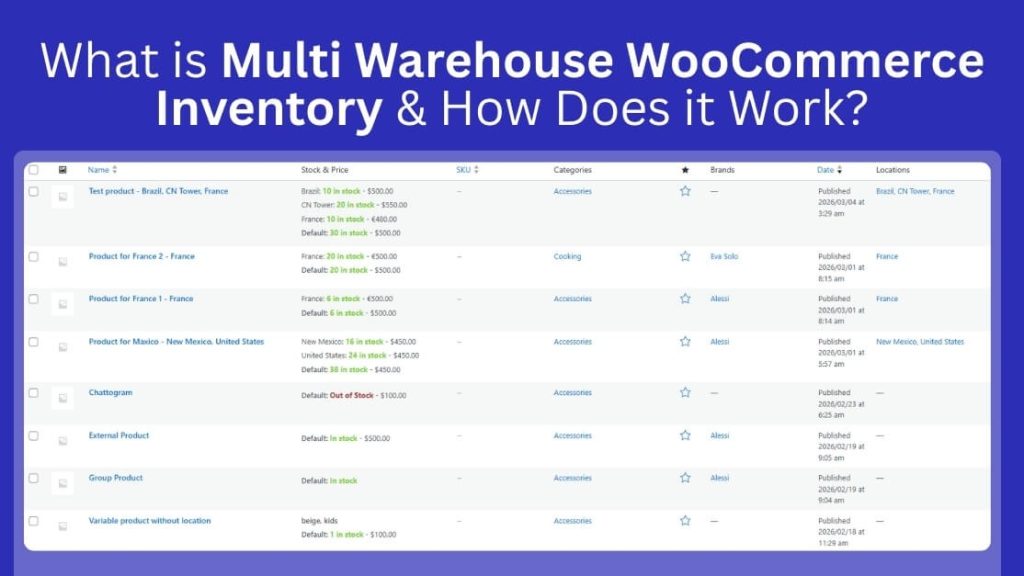
If you’re wondering what is multi warehouse WooCommerce inventory and how does it work, it is a system that helps a WooCommerce store manage product stock in multiple warehouses or locations. Instead of using one total stock number, it tracks inventory separately for each location and sends orders to the right warehouse for fulfillment, improving accuracy, shipping speed, and overall inventory control.
Keep reading to learn how multi-warehouse inventory works inside WooCommerce step by step. See how tracking stock by location improves order handling and delivery speed. Find out if multi-warehouse inventory is the right solution for your growing WooCommerce business.
What Does Multi-Warehouse Inventory Mean in WooCommerce?
Multi-warehouse inventory management transforms how online retailers handle fulfillment by distributing stock across multiple physical locations while maintaining a unified storefront. This approach optimizes shipping costs, reduces delivery times, and prevents stockouts through intelligent location-based inventory tracking.
Inventory Source
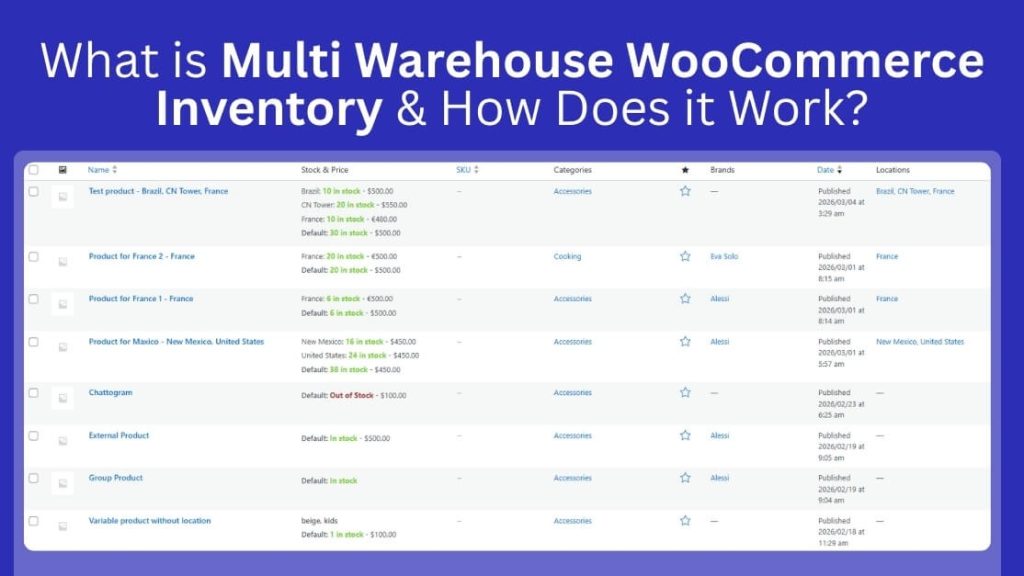
An inventory source is the origin point from which stock is stored and fulfilled. In WooCommerce multi-warehouse setups, this refers to any physical location, whether a warehouse, retail store, or distribution center, that holds products available for sale. Each source maintains its own stock quantity, pricing, and fulfillment rules. Think of it as the “supplier of record” for a specific geographical area or operational unit.
Warehouse
A warehouse is a physical storage facility where inventory is housed, managed, and shipped from. In multi warehouse WooCommerce inventory terminology, warehouses are specific types of inventory sources that typically handle bulk storage and order fulfillment rather than customer-facing retail operations. These facilities maintain precise geolocation data, dedicated store managers, and configurable shipping zones to streamline regional distribution. Key attributes include:
- Physical address with geolocation coordinates (latitude/longitude)
- Assigned store manager and contact details
- Configurable shipping zones and payment methods
- Operating hours and order acceptance windows
Stock Per Location
This refers to discrete quantity tracking for the same product across different physical locations. Rather than viewing inventory as a single aggregate number (“500 units total”), stock per location shows “150 units in Warehouse A, 200 in Warehouse B, 150 in Warehouse C”. This granularity enables:
- Location-specific availability displays for customers
- Intelligent order routing to the nearest fulfillment center
- Prevention of overselling at locations with zero stock
- Regional demand analysis and replenishment planning
Critical Distinctions: Multi-Warehouse vs. Multi-Store vs. Multi-Vendor
| Feature | Multi-Warehouse | Multi-Store | Multi-Vendor |
| Ownership | Single business entity owns all locations | Single business entity owns all stores | Multiple independent sellers on one platform |
| Inventory | Same products distributed across locations | Can have different products per store | Each vendor manages their own inventory |
| Purpose | Fulfillment optimization & shipping efficiency | Market segmentation or regional targeting | Marketplace model (like Amazon or Etsy) |
| Customer Experience | Sees unified catalog, ships from nearest location | May see different stores/brands | Buys from multiple sellers in one checkout |
| Technical Setup | Single WooCommerce store + inventory plugin | WordPress Multisite or separate installations | Marketplace plugin (e.g., Dokan, WC Vendors) |
| Order Routing | Automatic based on proximity/stock levels | Orders stay within respective store | Split by vendor, each handles their own shipping |
The Core Difference:
- Multi-warehouse: One store, many fulfillment locations (logistics optimization).
- Multi-store: Many branded storefronts, potentially shared inventory (market expansion).
- Multi-vendor: One storefront, many independent sellers (marketplace aggregation).
Example Scenario: Three Warehouses, Same Product
Setup: You’re selling “Ergonomic Office Chair – Black” through your single WooCommerce store, with stock distributed across:
| Location | Stock Qty | Geographic Region | Shipping Priority |
| Warehouse East (New York) | 45 units | Northeast US | Primary for NY, NJ, PA |
| Warehouse Central (Chicago) | 60 units | Midwest US | Primary for IL, WI, MI |
| Warehouse West (Los Angeles) | 30 units | West Coast US | Primary for CA, OR, WA |
How It Works:
- Customer in Boston: visits your store. The multi-inventory plugin detects their location via geolocation.
- Stock Display: The product page shows “Available: 45 units” (pulling from Warehouse East inventory) with estimated 2-day shipping.
- Order Placement: Customer purchases 2 chairs. The system automatically routes the order to Warehouse East and decrements stock to 43 units.
- Stock Alert: Warehouse West drops to 5 units (below threshold). The store manager receives a low-stock alert while Warehouse Central still shows healthy 60-unit levels.
- Reallocation: You transfer 20 units from Central to West to balance inventory, updating stock levels via CSV import or the smart stock manager dashboard.
- Overselling Prevention: If a simultaneous order from Seattle tries to buy the last 30 West Coast chairs, the system blocks the purchase or offers to ship from Chicago with a longer delivery time.
How Does WooCommerce Inventory Work by Default?
WooCommerce includes a simple inventory system designed for small and growing online stores. It tracks product quantities from one main stock source and updates numbers automatically after each sale. While this setup works well at first, it has limits as operations expand. Here is how the WooCommerce inventory works by default:
Single Stock Quantity System
WooCommerce uses one total stock number for each product in your store. You enter a single quantity, and the system treats it as your entire available inventory. This method works well for small shops with one storage location and simple order processing needs.
Stock Reduction When Order Is Placed
When a customer places an order, WooCommerce reduces the product stock automatically. The system subtracts the sold quantity from the main stock value. This process keeps numbers updated in real time and helps prevent selling items that are already out of stock.
No Built-In Warehouse Separation
WooCommerce does not separate inventory by warehouse or storage location. It treats all stock as if it exists in one place only. If you store products in different cities, the system cannot track how much inventory each warehouse holds individually.
Why This Becomes Limiting
This setup becomes limiting when your business grows and adds more storage locations. You cannot control fulfillment from specific warehouses or balance stock between regions. As demand increases, managing orders, shipping costs, and stock accuracy becomes harder without location-based tracking.
How Multi-Warehouse WooCommerce Inventory Works with Plugins or Tools?
Managing stock across several locations requires a clear structure and smart coordination. A multi-warehouse setup organizes inventory by location instead of one combined total. Let’s see how the system works in practice.
Warehouse Creation and Location Setup
The system first lets store owners create multiple inventory locations, such as warehouses, retail branches, or fulfillment hubs. Each location becomes a separate stock source inside the WooCommerce setup, making it possible to manage inventory by place instead of by one shared number.
Stock Assignment by Warehouse
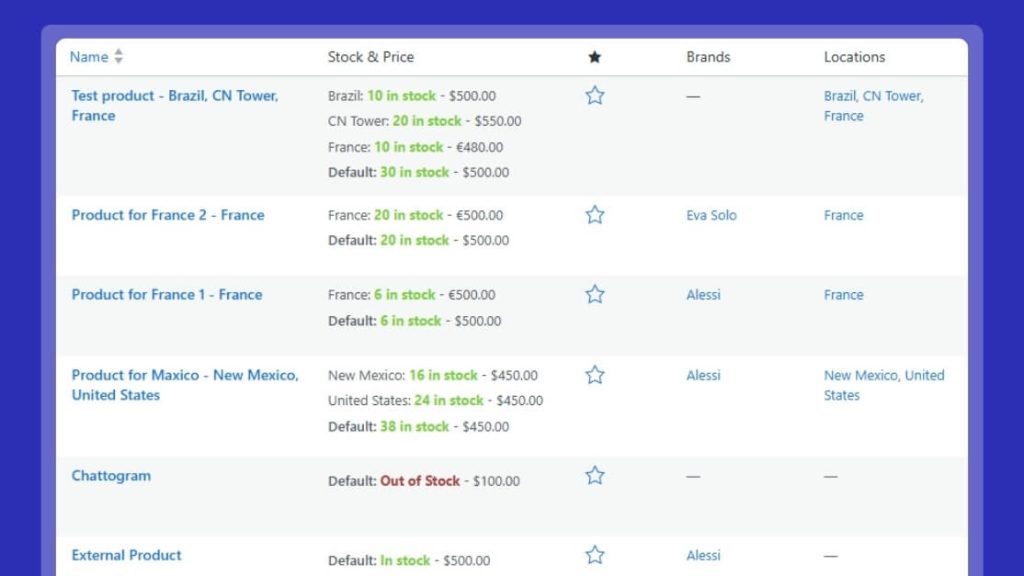
Products are then assigned stock quantities for each warehouse. This means the same SKU can have different available quantities in different locations. Instead of relying on one global stock count, the system tracks exactly how much inventory is stored at each warehouse.
Product and Variation-Level Tracking
Most tools support stock control not only for simple products but also for product variations. Sizes, colors, or other options can be tracked separately by warehouse, which helps keep inventory records more accurate for complex catalogs.
Order-Based Stock Deduction
When a customer places an order, the plugin or tool deducts stock from the warehouse selected for fulfillment. This keeps inventory updates tied to the correct location and prevents one warehouse from losing stock for an order shipped from another.
Warehouse Selection for Fulfillment
The system uses rules to decide which warehouse should fulfill the order. This may depend on stock availability, warehouse priority, customer region, shipping zone, or distance. Some setups allow manual selection, while others automate the decision.
Stock Reservation During Checkout
Many systems temporarily reserve stock while the customer completes checkout or payment. This helps prevent two customers from buying the same last unit from the same warehouse at the same time.
Syncing Inventory Changes
Inventory tools also keep stock updated when orders are canceled, refunded, returned, or edited. This helps maintain accurate warehouse-level counts and reduces the risk of stock mismatches over time.
Warehouse Transfers
Some plugins include transfer functionality that lets teams move stock from one warehouse to another. These transfers are recorded so both the sending and receiving locations stay accurate, and some systems also track stock while it is in transit.
Pickup and Location-Based Availability
If the store offers pickup or regional fulfillment, the system can show availability based on warehouse or store location. This allows customers to see only the locations that actually have stock and reduces fulfillment mistakes.
Reporting and Alerts
Multi-warehouse tools often include reporting by warehouse, along with low-stock alerts and replenishment signals. This helps store owners see which locations are running low, which are overstocked, and where inventory should be moved or reordered.
Integration with Other Systems
More advanced tools may connect with POS systems, ERPs, shipping platforms, or third-party logistics providers. This allows warehouse stock to stay aligned across different systems instead of being updated manually.
Centralized Control with Location-Level Accuracy
The main goal of these plugins and tools is to keep control centralized while inventory remains accurate by the warehouse. Store owners can manage everything from one system, but still know exactly where stock is stored, which warehouse fulfills each order, and how inventory moves across the business.
Practical Examples of Multi-Warehouse Inventory
Multi-warehouse inventory can support very different business models. The examples below show how stores use it to improve fulfillment, accuracy, and location-based stock control in real operations.
Regional Warehouses for Faster Delivery
A mid-sized electronics retailer sells nationally and maintains three fulfillment centers, one on the East Coast, one in the Midwest, and one on the West Coast. When a customer in Phoenix orders a laptop stand, the system automatically routes the order to the nearest warehouse with available stock, reducing both shipping time and cost.
Why it matters:
Customers get faster delivery without the retailer paying for premium overnight shipping from a single central location. Stock is replenished regionally based on demand patterns. The West Coast warehouse might carry more surf accessories, while the Midwest location stocks more agricultural tools.
Physical Store + Online (Local Pickup / BOPIS)
A furniture boutique has two brick-and-mortar locations in Austin and Nashville, plus an online WooCommerce store. Each store is registered as a warehouse/inventory source. When a customer orders a dining table online, they can choose:
- Ship to home → fulfilled from whichever store has stock
- Local pickup in Austin → reserved from Austin’s inventory only
- Local pickup in Nashville → reserved from Nashville’s inventory only
Why it matters:
This is Buy Online, Pick Up In Store (BOPIS) — one of the fastest-growing fulfillment models in retail. Stock doesn’t get oversold because each location’s inventory is tracked separately, and reservations are location-specific.
International Inventory Separation
A cosmetics brand sells in both the US and the EU. Due to import costs, customs delays, and regional regulations, they maintain a warehouse in New Jersey for North American orders and a warehouse in the Netherlands for European orders. The same product, a vitamin C serum, is stocked in both locations but managed independently.
Why it matters:
Customers in Germany aren’t accidentally fulfilled from New Jersey (triggering customs fees and 2-week delays). Tax compliance, currency handling, and shipping carriers are all managed cleanly per region. Some products may be legally restricted to one region and must never ship cross-border.
Franchise or Multi-Branch Operations
A specialty coffee equipment brand operates through a head office warehouse plus five franchised retail locations across the country. Each franchise can view and sell from its own local stock. The head office warehouse acts as a replenishment source when a branch runs low on espresso machines; it triggers a stock transfer from the central hub rather than a direct customer order.
Why it matters:
Each branch operates semi-independently, but the franchisor retains visibility into the total network inventory. Low-stock alerts, replenishment thresholds, and reporting roll up centrally, preventing one branch from unknowingly selling stock that another branch has already committed to a customer.
At a Glance
| Scenario | Warehouses Involved | Primary Benefit |
| Regional fulfillment | 3 national DCs | Speed + shipping cost savings |
| Store + online | 2 retail stores | BOPIS, reduced overselling |
| International | 1 US + 1 EU | Customs compliance, delivery speed |
| Franchise/branches | 1 HQ + 5 branches | Central visibility, local autonomy |
Key Benefits of Using Multi-warehouse Inventory in WooCommerce
Multi-warehouse inventory gives growing WooCommerce stores better control over stock and fulfillment. Instead of relying on one storage point, businesses manage products across several locations. This setup improves speed, reduces costs, and supports long term growth in competitive ecommerce markets. Here are the key benefits of using multi-warehouse inventory in WooCommerce:
Faster Shipping
Multi-warehouse inventory helps stores ship orders from the closest warehouse to customers. Shorter travel distances reduce delivery times and improve overall order satisfaction rates. Customers receive products faster, which builds trust and encourages repeat purchases. Quick delivery also helps stores compete with larger ecommerce brands.
Lower Logistics Costs
Shipping from nearby warehouses reduces fuel usage and carrier expenses significantly. Businesses spend less on long-distance shipping and cross-region transportation fees. Lower logistics costs increase profit margins without raising product prices. Stores can reinvest savings into marketing, inventory expansion, or customer service improvements.
Improved Stock Accuracy
Location based tracking gives clear visibility of stock levels in each warehouse. Store owners see exact quantities instead of relying on one combined number. This accuracy reduces overselling and prevents unexpected stock shortages. Better stock data supports smarter purchasing and inventory planning decisions.
Better Customer Experience
Customers see accurate product availability based on their selected warehouse location. Clear stock visibility reduces order cancellations caused by unavailable items. Faster shipping and reliable inventory build confidence during checkout. A smooth buying process increases satisfaction and strengthens long-term customer loyalty.
Operational Scalability
Multi-warehouse systems support business growth without disrupting daily operations. Stores can add new warehouses as demand increases in different regions. This flexibility allows expansion into new markets with controlled inventory management. Scalable systems prepare WooCommerce stores for long-term e-commerce success.
Challenges and Considerations of Multi-warehouse in WooCommerce
Managing multiple warehouses in WooCommerce improves control, but it also introduces new operational challenges. Store owners must plan carefully to avoid confusion and stock errors. Understanding these common issues helps businesses prepare better systems and smoother workflows across every inventory location.
- Split Shipments: Orders may contain items stored in different warehouses across regions. This setup can increase shipping costs and create multiple delivery timelines for customers.
- Variable Product Stock: Each warehouse tracks stock for every product variation separately. Managing sizes or colors across locations requires careful monitoring to avoid stock imbalance.
- Returns Management: Customers may return products to a different warehouse than the original shipping location. Staff must update stock correctly to prevent reporting errors and inventory confusion.
- Backorder Control: Some warehouses may allow backorders, while others restrict unavailable products. Managing these rules across locations requires clear planning and consistent configuration.
- Data Synchronization: Stock levels must update instantly across all connected warehouses and systems. Any delay in syncing data can cause overselling or inaccurate inventory reports.
When Do You Need Multi-Warehouse Inventory?
Growing WooCommerce stores often reach a stage where one stock location no longer supports daily operations. As order volume increases, inventory control becomes more complex and harder to manage manually. Multi-warehouse inventory becomes necessary when business expansion creates location-based storage and fulfillment demands. Here are some examples:
Operating Multiple Warehouses
You need multi-warehouse inventory when you store products in more than one physical location. Managing separate stock manually often leads to errors and shipping confusion. A structured system keeps each warehouse organized and clearly connected to your store operations.
Offering Local Pickup
Stores that provide local pickup from different branches benefit from location-based inventory tracking. Customers expect accurate stock visibility before choosing a pickup location. Multi-warehouse systems ensure each store displays only available products in real time.
Shipping From Multiple Regions
Businesses that ship from warehouses in different cities need better routing control. Sending orders from the nearest warehouse reduces delays and shipping costs. Multi-warehouse inventory helps assign orders to the correct regional fulfillment center.
Managing Franchise Branches
Franchise businesses often operate independent branches under one central WooCommerce store. Each branch may manage its own stock and sales performance. Multi-warehouse inventory allows controlled oversight without mixing stock quantities between locations.
Experiencing Stock Inconsistencies
Frequent stock mismatches signal that your current system lacks location control. Combined inventory numbers often hide shortages in specific warehouses. Multi-warehouse tracking improves visibility and reduces unexpected out-of-stock situations.
Frequently Asked Questions
Understanding multi-warehouse inventory in WooCommerce often raises practical and technical questions for store owners. Many businesses want clarity before changing their inventory structure. The answers below explain important details about how multi-location stock management works and what it means for daily store operations and long-term growth.
How Does Multi-Warehouse Inventory Improve Order Accuracy?
Multi-warehouse inventory improves order accuracy by linking each order to a specific warehouse with available stock. The system checks location-based quantities before confirming fulfillment, which reduces mistakes caused by shared stock totals. This method prevents incorrect shipping decisions and ensures the right warehouse handles each order. Clear warehouse assignment also lowers the risk of canceled orders due to hidden stock shortages.
Is Multi-Warehouse Inventory Suitable For Small WooCommerce Stores?
Yes, small WooCommerce stores can use multi-warehouse inventory if they manage stock in more than one location. Even a growing business with two storage spaces can benefit from better stock visibility and routing control. Early implementation helps avoid confusion as sales increase. It also prepares the store for future expansion without major system changes later.
Can You Track Inventory Performance By Warehouse?
Yes, multi-warehouse systems allow tracking performance metrics for each individual warehouse location. Store owners can review sales volume, stock movement, and low inventory levels by warehouse. This visibility helps identify which locations perform well and which need restocking. Detailed reporting supports smarter purchasing decisions and balanced inventory distribution across regions.
Does Multi-Warehouse Inventory Support Seasonal Stock Planning?
Yes, multi-warehouse inventory supports seasonal planning by allowing stock allocation across different locations. Businesses can move or assign products to warehouses based on regional demand trends. This flexibility helps prevent shortages during peak seasons in high-demand areas. It also reduces excess inventory in locations with slower sales activity.
Can Multi-Warehouse Inventory Help Reduce Delivery Delays?
Yes, multi-warehouse inventory helps reduce delivery delays by routing orders from the closest available warehouse. Shorter shipping distances improve transit times and lower the chance of logistics disruptions. Faster fulfillment increases customer satisfaction and strengthens brand reliability. Proper warehouse routing also reduces strain on a single fulfillment center during busy periods.
Closing Remarks
Managing inventory across several locations no longer needs to feel overwhelming or disorganized. As your store grows, relying on a single stock source can slow fulfillment and create costly mistakes.
Understanding what is multi warehouse WooCommerce inventory and how does it work helps you see how location-based tracking improves accuracy, routing, and customer satisfaction.
With the right setup, you gain better control over shipping speed, stock visibility, and long-term growth. Adopting a structured multi-warehouse approach positions your WooCommerce business for smoother operations and scalable success.